ScreenApp
Overview
ScreenApp is an AI-powered recording and transcription platform designed to capture, analyze, and summarize audio and video content. It serves as a comprehensive tool for professionals and students to record meetings, lectures, and conversations, turning scattered discussions into structured, searchable knowledge. By leveraging AI, the platform allows users to instantly generate meeting minutes, transcribe recordings, and extract key insights without the need for manual note-taking.
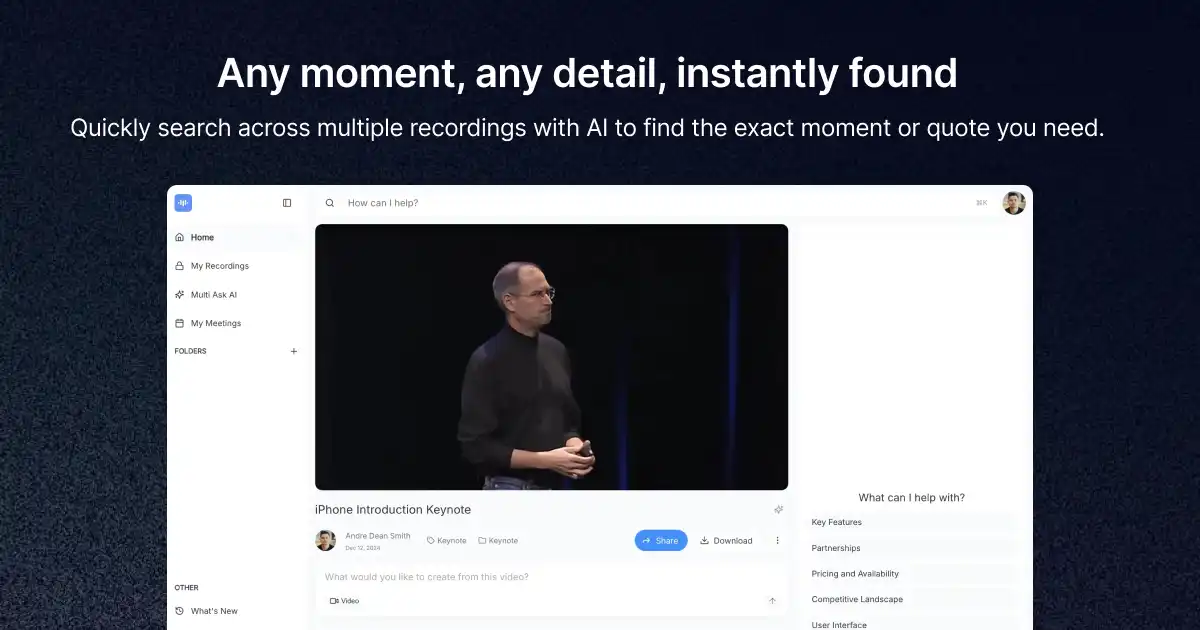
The tool is built for anyone who needs to manage large volumes of recorded information, such as project managers, operations teams, and researchers. Common use cases include recording virtual meetings to generate summaries, searching through past video archives to find specific moments, translating recordings in real-time, and exporting content into professional PDF documents. With support for cross-platform usage, including desktop apps, mobile apps, and a Chrome extension, ScreenApp acts as a centralized repository for information retrieval.
How to use it?
- Install the ScreenApp application or browser extension on your preferred device.
- Record your live meeting, lecture, or conversation, or upload an existing video or audio file to the dashboard.
- Allow the AI to automatically transcribe and process the content.
- Use the search function to find specific moments, ask the AI questions about the recording, or generate a summary and PDF report.
Features
ScreenApp is an AI tool that offers a free online screen recorder with webcam capabilities. It does not need to be installed or downloaded. Users can capture screen recordings with or without audio, and the tool produces recordings without watermarks. It also provides trim and share features for convenient editing and sharing. Additionally, ScreenApp includes an AI-driven video summarizer that converts videos into searchable texts. Users can securely store and share their recordings, transcribe videos using AI, and personalize recordings with webcam capture.
Similar Websites